

If you have an iPhone and you’re hard of hearing, you’ve probably already tried Apple Live Captions. It’s built in, it’s free, and it turns speech into text right on your screen. So it’s fair to ask the obvious question: why would anyone download a separate captioning app?
We asked ourselves the same thing. So instead of answering with marketing copy, we put Live Transcribe and Apple Live Captions side by side, ran them through five real-world tests, filmed everything, and measured the results by word error rate. The results tell a clear story, but not the one you might expect.
An Honest Way to Understand the Difference
Here’s the framing that makes everything below make sense. Think of Apple Live Captions as the starting line. In quiet, controlled settings, most captioning tools perform at a similar level, and Apple is no exception. Our Basic tier performs at that same level, so if you’ve ever used Apple Live Captions, you already know what baseline captioning feels like.
But Live Transcribe Pro isn’t a baseline captioning tool. It was built specifically for the hard places: the restaurant where the music competes with the person across from you, the family dinner where three people talk at once, the appointment where the doctor is facing the computer. Those are the places where captions stop being a convenience and start being the difference between participating in a conversation and reconstructing it afterward. And that’s exactly where the comparison stops being close.
The Five Tests
We ran both apps through the same five scenarios, using the same script, the same speakers, and the same rooms. Both phones sat side by side on the table so neither app had an advantage. Accuracy was measured by word error rate.
| Test | Live Transcribe | Apple Live Captions | Result |
|---|---|---|---|
| Quiet 1:1 conversation | 98% | 98% | Tie |
| Soft speech | 98% | 98% | Tie |
| Offline mode | 98% | 98% | Tie |
| 60 minutes’ use | 5% battery usage | 8% battery usage | Essentially a tie |
| Restaurant noise | 98% | 68% | Live Transcribe |
Read that chart with the framing above and the pattern is obvious. In every condition where captioning is easy to build, Apple performs at the baseline, and so do we. Then the room gets loud, and one app holds at 98% while the other drops one in three words. Apple Live Captions held up everywhere captions are easy to build. It fell apart in the one environment where deaf and hard-of-hearing people need them the most.
What 68% Actually Feels Like
Numbers on a chart are one thing, but here’s what a 68% accurate transcript looks like in practice. Someone across the table says something important and what you read is this:
“Your ███ called and ███ the appointment ███ Thursday.”
Maybe you can fill in the blanks, and maybe you can’t. Either way, you’re doing the work the captions were supposed to do for you. One word in three is gone, so every sentence becomes a puzzle and every important detail becomes a question mark.
Live Transcribe held at 98% in that same restaurant, with the same background noise and the same conversation. That’s not because noise is easy. It’s because the app was built for exactly this moment, and this moment is the whole point.
In this test, we measured word error rate for both apps in a noisy restaurant environment. Live Transcribe scored 98% accuracy. Apple Live Captions scored 68% accuracy. Result: Live Transcribe. When the room got loud, Live Transcribe kept the conversation readable while Apple Live Captions dropped roughly one in three words.
Even When the Scores Match, the Experience Doesn’t
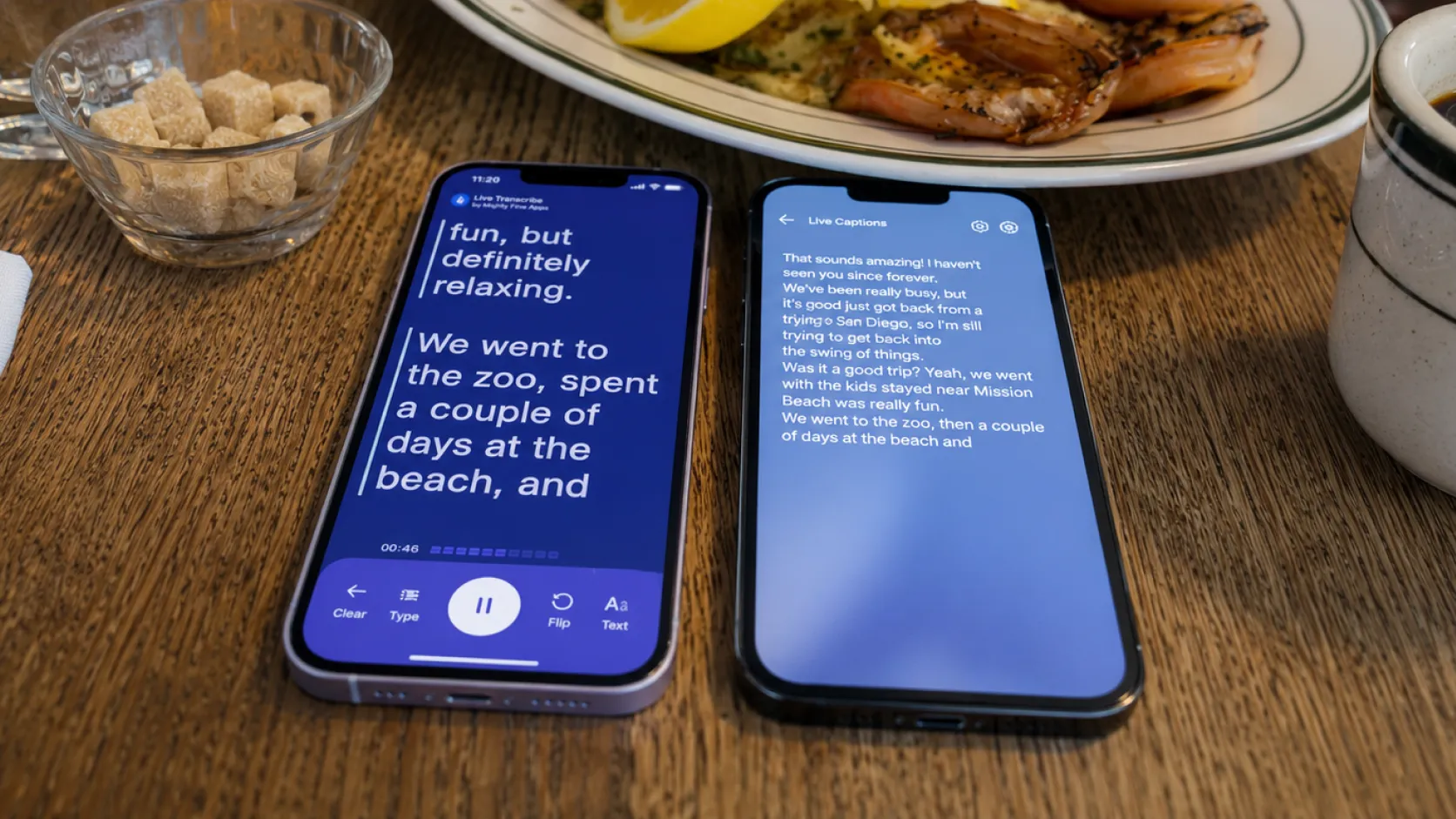
The tied scenarios deserve a closer look, because the accuracy numbers alone don’t show what it’s actually like to use each app. Watch the side-by-side videos and you’ll see the difference right away.
Live Transcribe processes and displays words faster, so the captions keep pace with natural speech instead of lagging a beat behind. The text is larger by default, which matters more than it sounds when you’re glancing at your phone mid-conversation rather than reading a screen at your desk. And in any setting with more than one speaker, Live Transcribe labels who said what, color-coding each speaker so you can follow the exchange rather than just the words.
That last one, speaker separation, changes group conversation in a way that’s hard to overstate. A wall of undifferentiated text from a dinner table where three people are talking isn’t really a transcript, it’s a puzzle. Knowing who asked the question, who answered it, and who changed the subject is what makes a conversation actually followable. So even where the scores tie, Live Transcribe is doing more of the work that makes conversation readable. The scores may be similar, but the experience isn’t.
In this test, we measured word error rate for both apps during a natural one-on-one conversation. Live Transcribe scored 98% accuracy. Apple Live Captions scored 98% accuracy. Result: Tie on accuracy, with Live Transcribe displaying words faster and in larger text.
In this test, we measured word error rate for both apps while speakers used soft, quiet voices. Live Transcribe scored 98% accuracy. Apple Live Captions scored 98% accuracy. Result: Tie on accuracy, with both apps handling quiet speech well.
In this test, we measured word error rate for both apps with no internet connection. Live Transcribe scored 98% accuracy. Apple Live Captions scored 98% accuracy. Result: Tie on accuracy, with both apps maintaining strong performance offline.
Why the Gap Exists, and Why It Won’t Close
It’s worth pausing on why the restaurant result looks the way it does, because it’s not an accident. Apple is a three-trillion-dollar company and Live Captions is one of its features. One of thousands, living a few taps deep in the Accessibility menu, competing for attention with everything else Apple builds. Live Transcribe isn’t one of our features. It’s the whole company. Captioning conversations for deaf and hard-of-hearing people is the only thing we work on, all day, every day.
That difference shows up exactly where you’d expect it to. A feature gets built to a solid baseline and then maintained. A dedicated product keeps pushing on the hard cases, because the hard cases are the entire business. It’s also why the small touches exist: the larger default text, the faster display, the color-coded speaker labels. Those choices get made when deaf and hard-of-hearing users are your only users and their feedback is the only feedback. So the gap in that chart isn’t something the next iOS update quietly fixes. It’s the difference between a checkbox and a mission.
The Bottom Line
Apple Live Captions is a useful feature, and if all your conversations happen in quiet rooms, the baseline may serve you fine. But nobody’s quality of life hinges on captions working in a silent room. It hinges on dinner with your family, the loud birthday party, the group conversation where everyone talks at once. Apple gives you the floor. Live Transcribe is what’s built above it.
“I use this with my hard-of-hearing senior patients when the hearing aids aren’t even enough. This works great. I have recommended it to my nursing and CNA staff to use as well.” — Verified App Store review from a physician
If you’ve ever sat at a loud table nodding along to a conversation you couldn’t follow, the restaurant test is the only row of that chart that matters. That’s the problem Live Transcribe was built to solve, and it’s the only problem we work on.
All tests were conducted by the Live Transcribe team using identical scripts, speakers, and conditions for both apps, with accuracy measured by word error rate. Full side-by-side videos of every test are embedded above and available on our YouTube channel.
The creative team behind Live Transcribe.

